Posts

Claim Your Free Voucher for DP600 or DP700 Today!

Image
Claim Your Free Voucher for DP600 or DP700 Today! If you are an employee of a Microsoft Partner organization, you may be eligible to receive a free voucher for Exam DP-700 or DP-600 . To be considered, please complete the form and ensure you meet the following criteria: Join the https://aka.ms/FabricCommunity Be a member of a Microsoft Partner organization (include your Partner name and Partner ID — optional)   Deadline to submit: October 20, 2025 at 11:59 PM PT Vouchers will be distributed via private message in the Fabric Community by October 21, 2025 Vouchers must be used by October 31, 2025. They will expire after this date. Exams must be taken by November 15, 2025.  Submit your request here .   NOTE: If you are not part of the Fabric Teams community, you will need to request to join https://aka.ms/JoinFabricPartnerCommunity as required by the terms and conditions. Prepare for the exam with these resources!  Get Certified: DP-700 Fabric Data Engineer (Accelerat...
AI in the Microsoft Power Platform - Community Days Philly 2025!

 Here are the slides from our talk. Thanks for attending! AI inside of the Microsoft Power Platform - CommunityDaysPhilly2025.pptx

Quiz Code!

Image
 

Intro to AI - Mexico City 2023

Image
Thanks to everyone who came out to my talk! Here's the link to my slides:  https://madshare-my.sharepoint.com/:b:/g/personal/davidepatrick_madsharepoint_com/EWa9dfAHDNBGq9LGQhWAsFcB3hqyvfNOrSggrPdi8gn1eA?e=PTLDyw

Bug with Image Gallery - Only 12 images show when zoom is set to 100 percent and text web page on page and text content exceeds images.

Image
Bug with Image Gallery - Only 12 images show when zoom is set to 100 percent and text web page on page and text content exceeds images. I've created this error on multiple sites, here's an example:  https://madshare.sharepoint.com/sites/hr The page has two web parts, one text and one Image Gallery. I've loaded 17 images and put enough text in the text web part so that the web part exceeds (length wise) the images displayed. Only 12 images are displayed, until you scroll all the way down the page or if you change the zoom percent of the browser.  The bug only appears when using the grid view. Using Brick or Carousel views works as expected.  Also, when the bug is activated, the rest of the page does not load (additional web parts do not display) until the page is scrolled all the way down. Tested on Chrome and Edge.  Screenshot of bug with images over 12 not loading: Screenshot of bug with images over 12 loaded after scrolling to the bottom:

Slides from my talk at #PowerPlatformBootCampDMV 2023

Here they are! Thanks for coming to my talk! https://1drv.ms/b/s!ArJpQLDPDNdJgsoaiiVMXbBkXiNSTA?e=2fSDvR

Welcome to MAD SharePoint!

http://www.meetup.com/MADSharePoint               ,---------------------------, | /---------------------\ | | | | | | | | | | | MAD SharePoint | | | | | | | | | | | \_____________________/ | |___________________________| ,---\_____ [] _______/------, / /______________\ /| /___________________________________ / | ___ | | | ) | _ _ _ [-------] | | ( | o o o [-------] | / _)_ |__________________________________ |/ / / /-------------------------------------/| ( )/ /-/-/-/-/-/-/-/-/-/-/-/-/-/-/-/-/-/-/-/ / /-/-/-/-/-/-/-/-/-/-/-/-/-/-/-/-/-/-/-/ / ~~~~~~~~~~~~~~~~~~...

Scottish Summit 2021 - Intro to Dataverse and Power Automate

Image
 Find my slides here from my talk at the Scottish Summit 2021! Intro to Dataverse and Power Automate Slides 

Office 365 Friday Nashville 2020

Image
 Find my talk slides here!  

Global Azure Virtual 2020 talk - SHAREPOINT AND AZURE - HOW TO JUMP START SHAREPOINT DEVELOPMENT FAST AND EASY WITH CLOUD POWER! ​

Here's the slides from our Global Azure Virtual 2020 talk on SharePoint and Cloud Power! SharePoint and Cloud Power!

Microsoft Power Platform Online Conference 2020

Image
Sign up to attend (in person or virtually) our MAD SharePoint meetings here! www.meetup.com/MADSharePoint 
Image
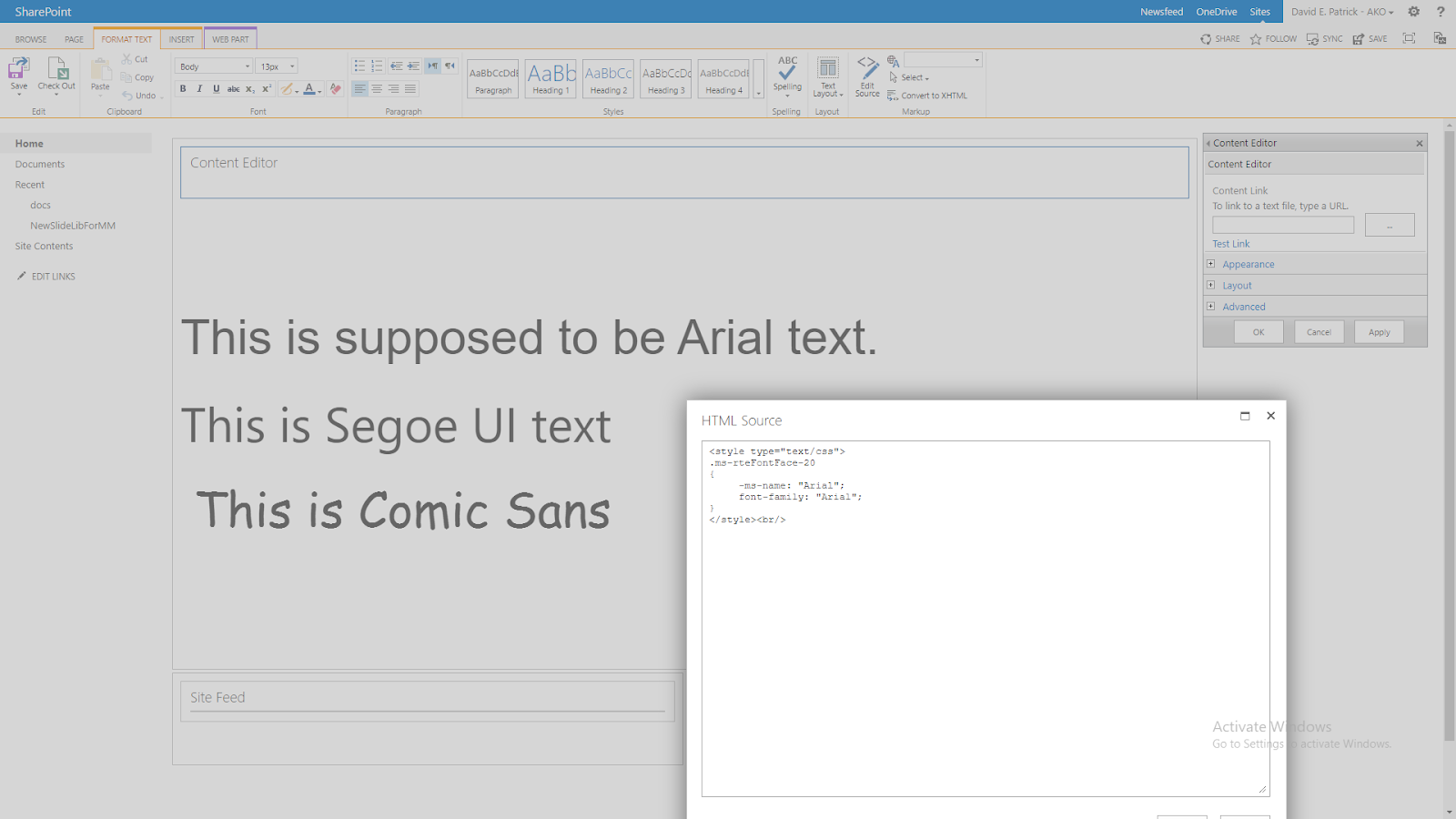
Missing the Arial font in SharePoint 2013? You know you had it in 2010, right? Here's the secret sauce to get it back <style type="text/css"> .ms-rteFontFace-20  {       -ms-name: "Arial";       font-family: "Arial";  } </style> Add the above to a Content Editor on the page and boom! Like magic, the Arial font is a valid choice again in the Font drop down under Format Text. Thanks to: https://www.catapultsystems.com/blogs/sharepoint-2013-missing-arial-font/
Issue: Content Editor Web Part is missing from SharePoint Online Solution: Run some PowerShell to get it back! 1.  Download and install the SharePoint Online Management Shell from this Microsoft page: https://www.microsoft.com/en-us/download/details.aspx?id=35588 2.  From your Start screen, type "sharepont" and then click SharePoint Online Management Shell 3.  In the SharePoint Online Management Shell, run the following five commands.  Leave the quotes, but replace all the text between and including the < and > characters with details relevant to your SharePoint site: $adminUPN="<the full email address of your SharePoint administrator account, for example: *** Email address is removed for privacy ***>" $orgName="<name of your Office 365 organization, for example: mycompany>" $userCredential = Get-Credential -UserName $adminUPN -Message "Type the password." Connect-SPOService -Url https://$orgName-admin.sharepoin...
Image
Found this tidbit in the Google trashcan (aka cache) and it saved me, so I thought I'd resurrect it a bit here: Credit goes to : Andy Gett Originally posted at: http://blog.bullseyeconsulting.com/archive/2018/07/30/sharepoint-designer-2013-workflow-tips.aspx Beware of Sending Long Strings to Workflow History Sometimes we need to see what is going on within our workflows by writing values to the history log for debugging, informative or other purposes. However, the log accepts up to 255 characters. Anything longer, and the workflow is suspended with this cryptic error message: Suspend this workflow  Activity in progress  Retrying last request. Next attempt scheduled in less than one minute. Details of last request: HTTP InternalServerError to https://mdigital.sharepoint.com/sites/Digitized_BioP/Test/_api/web/lists(guid'd7055b90-a4b2-4758-a4fc-dfcece0c1969')/Items Correlation Id: efb09adb-123f-475c-81d0-bc3377c5e8fe Instance Id: 0bd5c5e1-6955-4245-9d63-980c80065a50...